
When Auditing Bites Back: A Library Cache Lock Story.

We often assume that following the official documentation is the safest path, but sometimes, it leads to unexpected bottlenecks. In this post, I share a recent scenario where enabling Unified Audit Policies for individual users unexpectedly brought our system to a halt with severe locking issues. I’ll show you why the standard method caused this contention during peak loads and share the specific architectural change I implemented to fix it permanently.
Over my 14-year career as a DBA, I’ve encountered numerous issues related to
library cache locks in Oracle. From experience, the following causes consistently
show up as the most common contributors:
Excessive hard parsing—and, in some cases, excessive soft parsing as well.
Use of literal SQL due to a lack of bind variables.
DDL operations on frequently accessed (hot) objects.
Object dependency–driven invalidations.
Statistics gathering during peak workload periods.
Cursor mismatches.
An undersized or misconfigured shared pool.
I’ll admit I’m a bit biased: whenever I see library cache contention, my first instinct
is to look for excessive parsing and figure out what’s causing it. That bias, however,
ended up making this issue take longer to troubleshoot than it should have.
This article will not go into details about what the Library Cache, Shared Pool, or
Unified Audit are. Instead, it will show how a subtle difference in the official
documentation interpretation could have helped avoid this problem, and how you
may be able to avoid the same problem yourself and continue using the audit
policies you need.
The Unified Auditing Policy and its Impact.
Unified Auditing is a significant evolution of the disparate auditing mechanisms
found in earlier versions. Before Oracle 12c, auditing was fragmented across
several different trails (SYS.AUD$, SYS.FGA_LOG$, and OS-level files), each with
its own format and overhead. Unified Auditing consolidated these into a single,
high-performance architecture.
Unified Auditing is huge topic and has several use cases, but my focus here will be
concentrated on the following Unified Audit Policies use cases:
SQL Statements: Audit specific commands like DROP, TRUNCATE, or ALTER.
Data Access: Monitor SELECT, INSERT, UPDATE, and DELETE on specific tables or
views.
In many database environments I’ve worked in, certain tables contained sensitive
information that should not be accessible to all users. For users who are granted
access, the usage of these tables must be closely monitored to meet compliance
requirements. For this purpose, the database had a Unified Audit Policy similar to
the following:

Whenever a new user was created, the only thing we needed to do to associate
that user with the audit policy was the following:

This method was working fine until one day this happened:
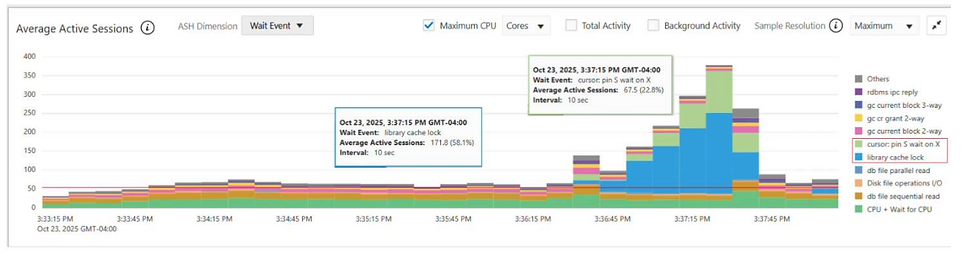
As you could see the ASH chart above several sessions were blocked by library
cache lock and cursor: pin S wait on X wait events.
Fortunately, thanks to the Autonomous Health Framework, the Oracle DIA0
process dumped the information needed to identify the root cause of the issue.
Below is an excerpt from the full log:

With this information, I was able to identify the session and the command it was
executing that caused the issue described above. It turns out that, in some cases,
the audit command used to link a new user to the audit policy can behave like this:

It doesn’t return control to the SQL*Plus prompt because it’s busy creating all the
underlying metadata it needs to work, which ends up causing a lot of contention
along the way.
At that point, I started wondering how I could tune this and avoid further
performance issues. My first step was to open an Oracle SR, and Oracle pointed
me to a document that says things like: “Don’t run AUDIT POLICY during periods of
high workload” and “This is expected behavior. The AUDIT POLICY statement
needs to acquire a large number of library cache and row cache locks in X mode.”
That’s where the investigation was supposed to end... but I wasn’t convinced.
How to Properly Enable a Unified Audit Policy.
It’s well known that many database security features come with performance
trade-offs. Whenever a DBA enables things like TDE, Database Vault, Data
Redaction, or Virtual Private Database (VPD)—also known as Row-Level
Security (RLS)—some level of performance impact is expected. In most cases,
though, that impact is acceptable or even negligible.
In this scenario, however, I couldn’t find a time when the database workload was
low enough to enable a Unified Audit Policy for a new user without affecting
application performance. I was stuck — and that’s when I decided to revisit the
official documentation on Unified Audit Policies. When I came across this section,
I started wondering whether it offered a more lightweight way to enable the audit
policy.

Then, I redesigned my audit policy to look like this:

Now, whenever I need to enable the audit policy for a new user, I simply do the
following:

By changing the way users are linked to audit policies, I was able to overcome the
system limitation, and DBAs can now enable audit policies whenever needed.
Several months have passed, and no issues have been reported.
Finally, I’ve updated my list of library cache contention scenarios:
Excessive hard parsing—and, in some cases, excessive soft parsing as well.
Use of literal SQL due to a lack of bind variables.
DDL operations on frequently accessed (hot) objects.
Object dependency–driven invalidations.
Statistics gathering during peak workload periods.
Cursor mismatches.
An undersized or misconfigured shared pool.
Database Security Features (Unified Audit Policies).
You don’t have to take my word for it — test it and validate it yourself. It may be
useful to you. And it’s worth mentioning that the opinions and thoughts shared
here are my own.
I hope you enjoyed this article, and happy troubleshooting!
Written by Italo Santos, Sr. DataOps Engineer at Bravo LT.


I read the post about When Auditing Bites Back: A Library Cache Lock Story, and it explains how enabling Oracle’s unified audit policies caused unexpected locking issues in the database during peak load and how the author changed the setup to avoid that contention by rethinking how users are linked to audit policies. I once struggled with a long draft in the library and used Affordable Research Proposal Editing to fix messy parts while I waited for ideas to click, and that experience helped me notice small errors I kept missing. It made me think that fixing bottlenecks, whether in code or writing, always starts with clear steps and patience.